mTLS
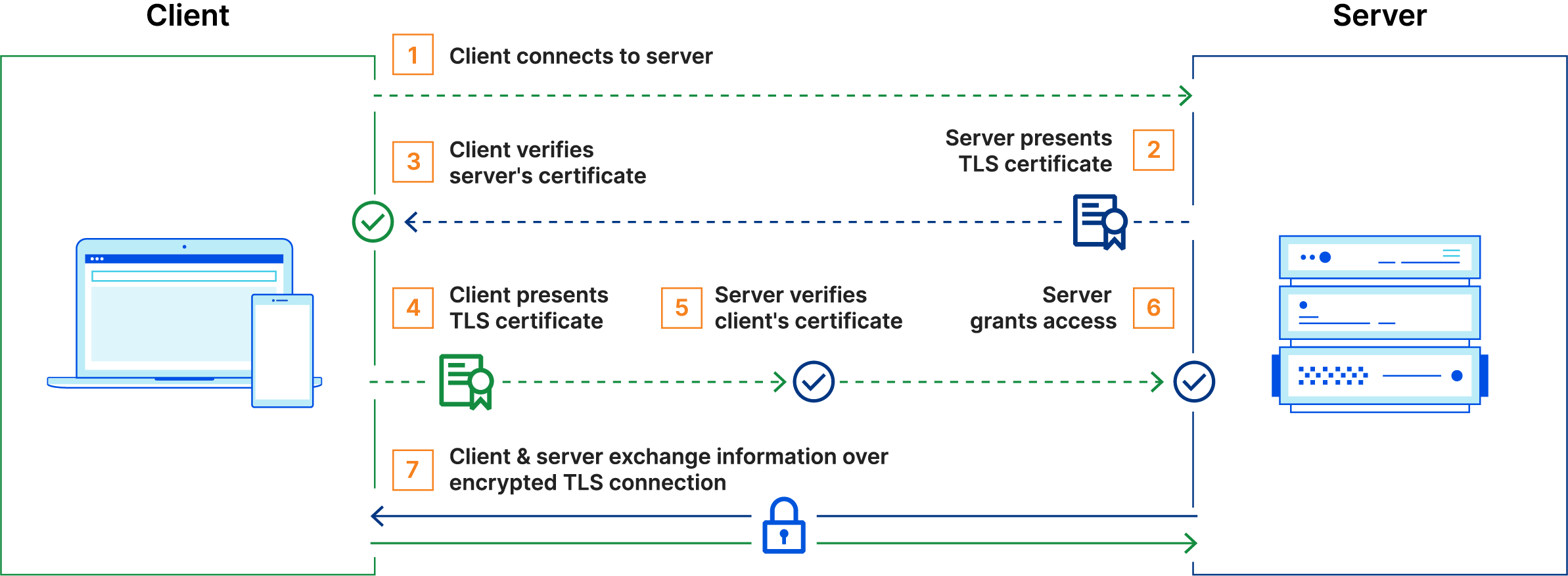
Implementations
Caddy
This will proxy a service without a native mTLS implementation on a TCP port through an instance of Caddy.
services:
  appdaemon:
    # service definition here

  mtls-proxy:
    image: caddy:alpine
    restart: unless-stopped
    ports:
      - "443:443"
    depends_on:
      - appdaemon
    volumes:
      - ./Caddyfile:/etc/caddy/Caddyfile:ro
      - /var/lib/tls:/var/lib/tls:ro
Caddy will only verify that the client cert was signed by the root CA, but will otherwise accept any connections. Change appdaemon:5050 to a route accessible by Caddy, depending on the service name and port.
:443 {
  tls /var/lib/tls/cert.pem /var/lib/tls/key.pem {
    client_auth {
      mode require_and_verify
      trust_pool file {
        pem_file /var/lib/tls/root_ca.crt
      }
    }
  }
  reverse_proxy appdaemon:5050
}
{
servers :443 {
strict_sni_host insecure_off
}
}
SNI/Host Mismatch
This part is necessary to use HTTPS and mTLS over IP addresses because many TCP stacks don't include an SNI with a request sent directly to an IP address, although they do send the IP address as a Host. This causes a mismatch between the host, which is the IP address, and the SNI, which is either missing or blank. The mismatch prevents the TLS connection, unless strict_sni_host is set to insecure_off.
Docker Daemon
docker context create soteria --description "Other Host" \
--docker "host=tcp://soteria.john-stream.com:2376,ca=/var/lib/tls/root_ca.crt,cert=/var/lib/tls/cert.pem,key=/var/lib/tls/key.pem"
Remove the "fd://" from the ExecStart line because it'll be defined in daemon.json
ExecStart=/usr/bin/dockerd --containerd=/run/containerd/containerd.sock
Add to the daemon.json file.
Prometheus
cat <<EOF > /etc/prometheus/web.yml
tls_server_config:
  client_auth_type: RequireAndVerifyClientCert
  client_ca_file: /var/lib/tls/root_ca.crt
  cert_file: /var/lib/tls/cert.pem
  key_file:  /var/lib/tls/key.pem
EOF
ExecStart=/usr/local/bin/prometheus \
    --web.config.file=/etc/prometheus/web.yml

ExecStartPost=/usr/bin/systemctl restart prometheus.service
Grafana
Update mTLS config on datasources
This snippet uses the Grafana API to update a Prometheus datasource that Grafana connects to with mTLS. This has to be updated whenever the cert gets rotated, so it's convenient to have it as part of the systemd service doing the rotation.
ExecStartPost=/usr/bin/sh -lc 'set -euo pipefail; jq -n \
--rawfile ca_cert /var/lib/tls/root_ca.crt \
--rawfile client_cert /var/lib/tls/grafana.crt \
--rawfile client_key /var/lib/tls/grafana.key \
-f /etc/grafana/prometheus_datasource.jq \
| curl -fsS -X PUT \
-H "@/var/lib/tls/api_headers" \
-d @- \
"https://grafana.john-stream.com:3000/api/datasources/4" \
| jq -r ".message"'
ExecStartPost=/usr/bin/systemctl restart grafana-server.service
This creates a file that stores the headers needed to authenticate with the Grafana REST API.
(read -r -s -p "Grafana API token: " TOKEN
umask 077; cat <<EOF > /var/lib/tls/api_headers
Content-Type: application/json
Authorization: Bearer $TOKEN
EOF
unset TOKEN
)
This creates a template file that has placeholders for the certificate information.
tee /etc/grafana/prometheus_datasource.jq > /dev/null <<'EOF'
{
    "name": "Prometheus",
    "type": "prometheus",
    "access": "proxy",
    "url": "https://prometheus.john-stream.com:9090",
    "jsonData": {
        "tlsAuth": true,
        "tlsAuthWithCACert": true
    },
    "secureJsonData": {
        "tlsCACert": $ca_cert,
        "tlsClientCert": $client_cert,
        "tlsClientKey": $client_key
    },
}
EOF