mTLS
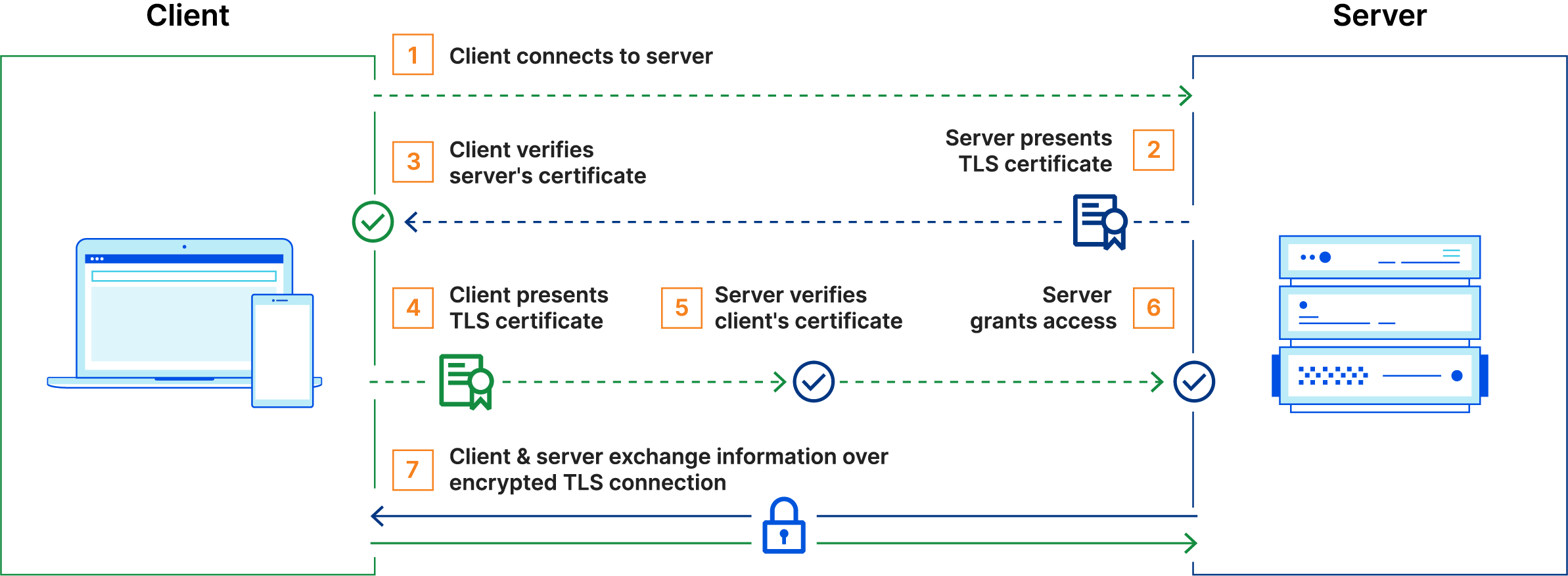
Node Registration
These variables are used later throughout the various commands. The IP address snippet depends on the eth0 interface.
DOMAIN="john-stream.com"
CA_HOST="janus.john-stream.com"
CA_FINGERPRINT=<step-ca fingerprint>
IP_ADDRESS=$(ip -4 addr show dev eth0 | awk '/inet /{print $2}' | cut -d/ -f1)
HOSTNAME=$(hostname -s)
CERT_DIR="/var/lib/tls"
(umask 077; mkdir -p "$CERT_DIR") && cd "$CERT_DIR" && \
step ca root root_ca.crt && \
step ca certificate "$HOSTNAME" cert.pem key.pem \
    --san "$HOSTNAME" \
    --san "$HOSTNAME.$DOMAIN" \
    --san "$IP_ADDRESS" \
    --provisioner admin
This will require pasting in the JWK provisioner password.
openssl x509 -noout -subject -issuer -ext subjectAltName,extendedKeyUsage -enddate -in cert.pem
The certs are valid for the time being, but they'll have to be renewed eventually
step certificate p12 cert.p12 cert.pem key.pem --ca root_ca.crt --no-password --insecure
Wizard Script
Process
- Securely creates the
/var/lib/tlsdir withumask - Downloads the root CA cert into
root_ca.crt - Creates private key and signed cert in
key.pemandcert.pem - Creates renewal service and timer in
systemd
Sidecar
Caddy
This will proxy a service on a TCP port through an instance of Caddy.
services:
  appdaemon:
    # service definition here

  mtls-proxy:
    image: caddy:alpine
    restart: unless-stopped
    ports:
      - "443:443"
    depends_on:
      - appdaemon
    volumes:
      - ./Caddyfile:/etc/caddy/Caddyfile:ro
      - /var/lib/tls:/var/lib/tls:ro
Caddy will only verify that the client cert was signed by the root CA, but will otherwise accept any connections. Change appdaemon:5050 to a route accessible by Caddy, depending on the service name and port.
# Uncomment this to use mTLS with requests sent directly to this IP address.
# {
#   servers :443 {
#     strict_sni_host insecure_off
#   }
# }

:443 {
  tls /var/lib/tls/cert.pem /var/lib/tls/key.pem {
    client_auth {
      mode require_and_verify
      trust_pool file {
        pem_file /var/lib/tls/root_ca.crt
      }
    }
  }
  reverse_proxy appdaemon:5050
}
SNI/Host Mismatch
This part is necessary to use HTTPS and mTLS over IP addresses because many TCP stacks don't include an SNI with a request sent directly to an IP address, although they do send the IP address as a Host. This causes a mismatch between the host, which is the IP address, and the SNI, which is either missing or blank. The mismatch prevents the TLS connection, unless strict_sni_host is set to insecure_off.
Envoy
These are just the important bits. The full config is found below.
- Listener
-
Accept incoming connections on port 10000.
- Transport Socket
-
Sets up TLS on the socket using the given file names.
spiffe://john-stream.comcan be changed to filter connections by SPIFFE identity at the TLS layer.- transport_socket: name: envoy.transport_sockets.tls typed_config: "@type": type.googleapis.com/envoy.extensions.transport_sockets.tls.v3.DownstreamTlsContext require_client_certificate: true common_tls_context: tls_params: tls_minimum_protocol_version: TLSv1_3 # (1)! validation_context: trusted_ca: { filename: /certs/root_ca.crt } match_typed_subject_alt_names: - san_type: URI matcher: prefix: spiffe://john-stream.com # (2)! tls_certificates: - certificate_chain: { filename: /certs/cert.pem } private_key: { filename: /certs/key_pkcs8.pem } # (3)! - Access Log
-
Logs access to a file.
- Cluster Route
-
Routes requests to the right cluster, which is just the backend service (defined below).
- Route-Based Access Control
-
Control access based on route and identity. Additional policies
- name: envoy.filters.http.rbac typed_config: "@type": type.googleapis.com/envoy.extensions.filters.http.rbac.v3.RBAC rules: action: ALLOW policies: "ubuntu-policy": permissions: - and_rules: rules: - header: name: ":path" string_match: prefix: "/john-ubuntu" principals: - authenticated: principal_name: exact: "spiffe://john-stream.com/ubuntu" "p14-policy": permissions: - and_rules: rules: - header: name: ":path" string_match: prefix: "/john-p14s" principals: - authenticated: principal_name: exact: "spiffe://john-stream.com/john-p14s" "gitea-policy": permissions: - and_rules: rules: - header: name: ":path" string_match: prefix: "/gitea" principals: - authenticated: principal_name: exact: "spiffe://john-stream.com/gitea" - Cluster
-
Define the backend service cluster.
Full envoy config
static_resources:
  listeners:
  - name: listener_0
    address:
      socket_address:
        address: 0.0.0.0
        port_value: 10000
filter_chains:
- filter_chain_match:
server_names: ["*.john-stream.com"]
    - transport_socket:
        name: envoy.transport_sockets.tls
        typed_config:
          "@type": type.googleapis.com/envoy.extensions.transport_sockets.tls.v3.DownstreamTlsContext
          require_client_certificate: true
          common_tls_context:
            tls_params:
              tls_minimum_protocol_version: TLSv1_3 # (1)!
            validation_context:
              trusted_ca: { filename: /certs/root_ca.crt }
              match_typed_subject_alt_names:
              - san_type: URI
                matcher:
                  prefix: spiffe://john-stream.com # (2)!
            tls_certificates:
            - certificate_chain: { filename: /certs/cert.pem }
              private_key: { filename: /certs/key_pkcs8.pem } # (3)!
filters:
- name: envoy.filters.network.http_connection_manager
typed_config:
"@type": type.googleapis.com/envoy.extensions.filters.network.http_connection_manager.v3.HttpConnectionManager
stat_prefix: ingress_http
use_remote_address: true
http2_protocol_options:
max_concurrent_streams: 100
          access_log:
          - name: envoy.access_loggers.file
            typed_config:
              "@type": type.googleapis.com/envoy.extensions.access_loggers.file.v3.FileAccessLog
              path: "/var/log/envoy/access.log"
          route_config:
            name: local_route
            virtual_hosts:
            - name: local_service
              domains: ["*"]
              routes:
              - match:
                  prefix: "/"
                route:
                  cluster: restic
http_filters:
          - name: envoy.filters.http.rbac
            typed_config:
              "@type": type.googleapis.com/envoy.extensions.filters.http.rbac.v3.RBAC
              rules:
                action: ALLOW
                policies:
                  "ubuntu-policy":
                    permissions:
                      - and_rules:
                          rules:
                            - header:
                                name: ":path"
                                string_match:
                                  prefix: "/john-ubuntu"
                    principals:
                      - authenticated:
                          principal_name:
                            exact: "spiffe://john-stream.com/ubuntu"
                  "p14-policy":
                    permissions:
                      - and_rules:
                          rules:
                            - header:
                                name: ":path"
                                string_match:
                                  prefix: "/john-p14s"
                    principals:
                      - authenticated:
                          principal_name:
                            exact: "spiffe://john-stream.com/john-p14s"
                  "gitea-policy":
                    permissions:
                      - and_rules:
                          rules:
                            - header:
                                name: ":path"
                                string_match:
                                  prefix: "/gitea"
                    principals:
                      - authenticated:
                          principal_name:
                            exact: "spiffe://john-stream.com/gitea"
- name: envoy.filters.http.router
typed_config:
"@type": type.googleapis.com/envoy.extensions.filters.http.router.v3.Router
  clusters:
  - name: restic
    connect_timeout: 0.25s
    type: STRICT_DNS
    lb_policy: ROUND_ROBIN
    load_assignment:
      cluster_name: restic
      endpoints:
      - lb_endpoints:
        - endpoint:
            address:
              socket_address:
                address: rest-server
                port_value: 8000
Test Commands
Services
Docker Daemon
docker context create soteria --description "Other Host" \
--docker "host=tcp://soteria.john-stream.com:2376,ca=/var/lib/tls/root_ca.crt,cert=/var/lib/tls/cert.pem,key=/var/lib/tls/key.pem"
Remove the "fd://" from the ExecStart line because it'll be defined in daemon.json
ExecStart=/usr/bin/dockerd --containerd=/run/containerd/containerd.sock
Add to the daemon.json file.
Prometheus
cat <<EOF > /etc/prometheus/web.yml
tls_server_config:
  client_auth_type: RequireAndVerifyClientCert
  client_ca_file: /var/lib/tls/root_ca.crt
  cert_file: /var/lib/tls/cert.pem
  key_file:  /var/lib/tls/key.pem
EOF
ExecStart=/usr/local/bin/prometheus \
    --web.config.file=/etc/prometheus/web.yml

ExecStartPost=/usr/bin/systemctl restart prometheus.service
Grafana
Update mTLS config on datasources
This snippet uses the Grafana API to update a Prometheus datasource that Grafana connects to with mTLS. This has to be updated whenever the cert gets rotated, so it's convenient to have it as part of the systemd service doing the rotation.
ExecStartPost=/usr/bin/sh -lc 'set -euo pipefail; jq -n \
--rawfile ca_cert /var/lib/tls/root_ca.crt \
--rawfile client_cert /var/lib/tls/grafana.crt \
--rawfile client_key /var/lib/tls/grafana.key \
-f /etc/grafana/prometheus_datasource.jq \
| curl -fsS -X PUT \
-H "@/var/lib/tls/api_headers" \
-d @- \
"https://grafana.john-stream.com:3000/api/datasources/4" \
| jq -r ".message"'
ExecStartPost=/usr/bin/systemctl restart grafana-server.service
This creates a file that stores the headers needed to authenticate with the Grafana REST API.
(read -r -s -p "Grafana API token: " TOKEN
umask 077; cat <<EOF > /var/lib/tls/api_headers
Content-Type: application/json
Authorization: Bearer $TOKEN
EOF
unset TOKEN
)
This creates a template file that has placeholders for the certificate information.
tee /etc/grafana/prometheus_datasource.jq > /dev/null <<'EOF'
{
    "name": "Prometheus",
    "type": "prometheus",
    "access": "proxy",
    "url": "https://prometheus.john-stream.com:9090",
    "jsonData": {
        "tlsAuth": true,
        "tlsAuthWithCACert": true
    },
    "secureJsonData": {
        "tlsCACert": $ca_cert,
        "tlsClientCert": $client_cert,
        "tlsClientKey": $client_key
    },
}
EOF