AppDaemon with MQTT
MQTT is an OASIS standard messaging protocol for the Internet of Things (IoT). It is designed as an extremely lightweight publish/subscribe messaging transport that is ideal for connecting remote devices with a small code footprint and minimal network bandwidth.
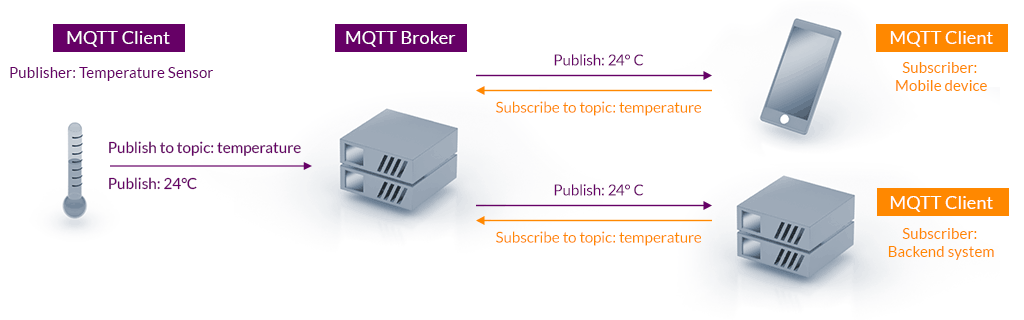
Broker
Using MQTT requires setting up a broker. The best broker to use is (Eclipse) Mosquitto, which can easily be set up in 2 ways:
-
As a Docker container
Example Implementation
docker-compose.ymlservices: mqtt: container_name: mosquitto image: eclipse-mosquitto restart: unless-stopped volumes: - /etc/localtime:/etc/localtime:ro - /etc/timezone:/etc/timezone:ro - ./mosquitto/config:/mosquitto/config - ./mosquitto/data:/mosquitto/data - ./mosquitto/log:/mosquitto/log ports: - 1883:1883Create a variable with the passwordecho "Please input the mosquitto password:" && read -s MOSQUITTO_PASSWORD MOSQUITTO_USER=homeassistantWriting the password into a variable like this keeps it from being stored in the shell history.
Create the password in Mosquittodocker compose run -it --rm mqtt mosquitto_passwd -b -c /mosquitto/config/pwfile $MOSQUITTO_USER $MOSQUITTO_PASSWORDThis command uses
mosquitto_passwdto create a new password file with the right format and in the right place. -
- Still requires the MQTT integration
AppDaemon Plugin
AppDaemon connects to an MQTT broker via a plugin, analogous to the HASS plugin used to connect to an instance of Home Assistant.
Plugin Configuration
appdaemon:
  ...

  plugins:
    mqtt:
      type: mqtt
      namespace: mqtt # (1)!
      client_host: 192.168.1.200 # (2)!
      client_user: homeassistant
      client_password: !secret mqtt_password # (3)!
      client_topics:
        - zigbee2mqtt/# # (4)!
- Usually the
HASSplugin has thedefaultnamespace, so this one should be different. You'll need to refer to this to listen forMQTT_MESSAGEevents. - Set this to the IP address where the broker is running.
mqtt_passwordneeds to be set in thesecrets.yamlfile.- This subscribes to all the zibgee2mqtt topics. More information about topic wildcards
Usage
Apps that will use the plugin should inherit from it to access methods like mqtt_subscribe, mqtt_unsubscribe, and mqtt_publish.
from appdaemon.plugins.mqtt.mqttapi import Mqtt

class MyMQTTApp(Mqtt):
    def initialize(self):
        self.log("Started MQTT app")
Responding to Messages
This example shows how to subscribe to the event emitted when an MQTT message has been received.
This code assumes that you have use_dictionary_unpacking enabled
import json

from appdaemon.adapi import ADAPI


class Button(ADAPI):  # (1)!
    def initialize(self):
        name = self.args['button']
        self.handle = self.listen_event(
            self.handle_button,
            'MQTT_MESSAGE',
            namespace='mqtt', # (2)!
            topic=f'zigbee2mqtt/{name}',
        )
        self.log('Started MQTT app')

    async def handle_button(self, event_name, data, **kwargs):
        data['payload'] = json.loads(data['payload'])
        if data['payload']['action'] != '':
            json_str = json.dumps(data, indent=4)
            self.log(f'{event_name} callback with\n{json_str}\n{kwargs}')
- Inherit from ADAPI because we don't need to subscribe or publish anything
- You might have to change this depending on what namespace you assigned in the plugin config in
appdaemon.yaml
import json

from appdaemon.adapi import ADAPI

class Button(ADAPI): # (1)!
    def initialize(self):
        name = self.args['button']
        self.handle = self.listen_event(
            self.handle_button,
            'MQTT_MESSAGE',
            namespace='mqtt', # (2)!
            topic=f'zigbee2mqtt/{name}',
            payload=self.payload_filter,
        )
        self.log(f"Started MQTT app in namespace '{self._namespace}'")

    @staticmethod
    def payload_filter(payload: str):
        try:
            return json.loads(payload)['action'] != ''
        except Exception:
            return False

def handle_button(self, event_name, data, **kwargs):
    data['payload'] = json.loads(data['payload'])
    json_str = json.dumps(data, indent=4)
    self.logger.info(f'{event_name} callback with\n{json_str}\n{kwargs}')
- Inherit from ADAPI because we don't need to subscribe or publish anything
- You might have to change this depending on what namespace you assigned in the plugin config in
appdaemon.yaml
INFO App1: MQTT_MESSAGE callback with
{
    "topic": "zigbee2mqtt/Button01",
    "wildcard": "zigbee2mqtt/#",
    "payload": {
        "action": "single",
        "battery": 100,
        "device_temperature": 26,
        "linkquality": 216,
        "power_outage_count": 52,
        "voltage": 3035
    }
}
{'topic': 'zigbee2mqtt/Button01', '__thread_id': 'thread-1'}